Help for Candidates
Profile Publishing and Management
Job Search and Available Information
Facebook - Helpbook
"My Account" and How to Use It
Stopping Ad Publication
Closing Account
All About... Payment Options on the Site
Safety
Registration
3 options for using the helpbook platform
Is my ad published immediately?
Can I change details after registering?
3 options for using the site helpbook
Using the site without registration
Using the site without registration allows basic experience including searches and viewing job ads. But to benefit from the site – i.e., to find work – registration is required.
Registration with free basic package
Registering on the site with a free plan allows you to find good work comfortably and efficiently:
- Personal profile publishing: Your personal profile will allow you to receive inquiries only from employers registered on the site. That is, users not registered on the site will not be able to see your phone number.
In addition, after registration you can add ads for additional employment fields – one ad per field on the site.
Employment fields on helpbook:
Child care
Housekeeping and cooking
Dog walking and pet care - Building a strong profile: Uploading a photo and intro video, connecting with Facebook, entering recommender details and receiving reviews from previous employers who are site members. All of these and more strengthen your profile and credibility and help you find work quickly. (More details on these options – later in the help screen).
- Contacting employers: To apply for jobs and see employer contact details you must register on the site. Viewing employer contact details is only possible after applying for a job. Employer contact details are not always published (depending on the employer's package and preferences).
- Using the personal area: Your personal space on the site where you can add and delete ads, change personal details, write personal notes on ads you found and save your favorite job ads.
Registration with paid package
A paid package is designed to speed up the job search process by highlighting and promoting your profile in search results. The payment is one-time for a fixed period, and in return:
- Visual highlighting of your profile so it stands out among other results.
- Promotion in search and general result sorting on helpbook.
- Priority in contacting your recommenders and adding the recommendation to the site.
At the end of the package period, the account will automatically switch to free package status, and your ads will continue to be published in normal display.
So, how do you register?
Registration is done in a few simple and quick steps. All you need is to fill in personal details, upload a photo and short video (optional), provide recommender details (optional) and choose a package. It is important to fill in the information fully and provide relevant and up-to-date information.
Is my ad published immediately?
Not necessarily. Processing the ad in the system may take time, from writing to actual publication. We do everything to meet our commitment of up to one business day.
Can I change details after registration?
Certainly. After completing registration you can manage all your data through the Personal Area. You can also add information and strengthen your profile in the My Profile tab in the personal area. It is important to ensure your information is updated and detailed enough so your profile is attractive. helpbook gives you the opportunity to present a comprehensive, focused and professional view of yourself – to create a positive impression and trust even before the first conversation.
Profile Publishing and Management
What details of yours are published on the site, and who can view them?
Do you have to pay to publish an ad?
Why is it recommended and important to fill in a full address?
What details of yours are published on the site, and who can view them?
On helpbook we have created for you the option to build a comprehensive and rich profile that presents your skills and preferences and builds trust and credibility – which are very important metrics in the type of jobs helpbook specializes in. The basic information in your ad will be displayed to all site users, to maximize the number of viewers of your ad. However, some of the information in your profile (such as contact details, etc.) will be protected by the site and revealed only to employers subscribed to the site with the appropriate package (there are several types of employer packages that differ in the details visible to them) – this is a means of filtering inquiries, ensuring only serious employers will contact you.
Personal details?
Name: Only your first name and sometimes one letter of your last name will be displayed to everyone. Your full name will be visible only to employers registered on the site with the premium HelpGreen package.
Address: To protect your privacy, your address will be displayed on the map only in the vicinity and at a random distance from the address you provided. This way viewers of your ad will see your area of residence (and yes, your ad will appear in candidate search results by area). Your exact address will always remain confidential in the site system.
Relevant experience
During site registration, candidates are required to fill out a comprehensive questionnaire built specifically for the job they are interested in. The candidate profile presents information relevant to a specific field, so a child care candidate profile will differ from a housekeeping and cooking candidate profile. The questionnaire includes yes/no questions as well as open questions – such as detailing experience and hobbies. The goal is to allow candidates to present themselves openly with emphasis on information relevant to a specific job.
Location and availability
Candidates are asked to indicate in which area or locality they want to work, not necessarily their area of residence. What does that mean? Someone who lives in one place and wants to work in another area can indicate that. In addition, candidates are invited to mark the exact days and hours they are available for work. This information appears as part of the ad and is visible to all site users, to attract relevant inquiries.
Contact details
Candidates must provide contact details during registration to maintain credibility. You can choose to publish both phone and email address. This information is visible only to employers subscribed to the site with the HelpGreen package.
Recommenders
Candidates are invited to fill in recommender names, and recommender details will remain stored in the system and will not appear in the ad at all except for first name and first letter of last name for credibility purposes. We will try to contact recommenders by phone and get a recommendation from them that we will record with their approval and make available for playback in the personal profile.
helpbook cannot commit to recording all recommendations, as the service is being tested and depends on the degree of cooperation.
All site users can see whether a recording exists on the site, however, listening to recordings is available only to registered employers.
Video and photo
Candidates are invited to upload or take a photo and record a short intro video. Research has proven conclusively that videos are an important service for both candidates and employers for impression purposes – with significantly higher chances of contact when there is a video. This exposure is not suitable for everyone so there is no obligation to upload video and photo. The photo is visible to all site users, while
watching the video is accessible only to employers registered on the site.
Reviews
To generate a credibility metric for the site, employers who registered in the past or those currently registered with a paid employer package may write reviews about candidates. Reviews are visible to all site users.
Back to menu
Additional indicators
In the personal profile displayed on the site, additional details appear that indicate seriousness and credibility: whether the candidate's email was verified, whether candidates connected to the site via Facebook.
Phone verification During registration there is a phone verification process by sending an SMS. If your phone does not receive SMS we will contact you. Your profile will show that your phone number was verified.
Email verification is sent during registration to the email address you provided, with a link for email verification. Clicking the link will return you to the site and automatically verify your email address. Even if you chose not to expose your email in your ad, the fact that you verified your email will appear in your profile as a credibility metric, and is essential for building trust with employers.
Facebook connection: Initial registration or logging into helpbook via Facebook saves you from remembering another password, and adds another layer of credibility that gives employers a sense of security.
Your personal profile will show that you connected to the site via Facebook.
Multiple candidacies
Candidates can apply for work in multiple fields. As long as all ads are active, they will all be displayed in the personal profile.
Do you have to pay to publish an ad?
Absolutely not! Profile publishing is included in the site's basic publishing package. The basic package includes both viewing full job ads (including contact details if published) and publishing an ad, all free of charge. The site also offers a paid package for candidates, more details >>
Why is it recommended and important to fill in a full address?
The helpbook search mechanism works by location, thus reducing irrelevant inquiries and encouraging relevant ones.
Important to know that besides address of residence (which is not fully published on the site), candidates are invited to indicate in the ad where they want to work. That is, candidates living in Ramat Gan can define the entire central region as relevant, or alternatively only central Tel Aviv as a relevant area. This mechanism aims to create maximum match between candidate requirements and employer requirements seeking workers.
No need to worry! helpbook protects your privacy and does not expose the exact address except for the locality name. The map display is at a random location and random radius, referring to the real address area, but not exposing it.
Job Search
How to search for jobs on the site?
Who is responsible for the data provided in published jobs?
How to search for jobs on the site?
On helpbook much thought has been invested in the search engine and producing useful information.
The goal is convenient and intuitive search, enabling focused and efficient search for relevant jobs.
Basic search
The main search "bar" is at the top of the page

The Results button is on the left side of the search bar. Before clicking it you need to define what exactly you are searching for. First, whether you are searching for job candidates or jobs – job ads. Also, choose the employment field from the options:
- Child care
- Housekeeping and cooking
- Caregivers for seniors and assistance
- Dog walking and pet care
Each search category has subcategories. For example, in child care you can also choose a subcategory from the same menu:
- Babysitter
- Nanny
- Au pair
- Family daycare
- Kindergarten teacher
- Summer camp
Search by area
Define search area. Search areas are ranked from searching all areas (i.e. the whole country), search in the central region and so on. Alternatively you can type a locality name and the search will focus on it.
Search by radius
In this search you can type the exact address of your place of residence and search for jobs within a certain radius in the area.
Search result displays
Two options for viewing search results
- List view of results
A view showing a list of ads that came up in the search with only basic details and a small map for job location. Clicking on the ad will open the full job description including all its details. - Map view of results
To switch to map view click the map view button. Here the ads are displayed on a large map, with a table listing the ads. Clicking on the ad name in the table will locate it on the map with basic details, and clicking on the window will lead to a view with full details.
Sorting
By default, search results are sorted according to helpbook site sorting. You can choose different sorts, for example by distance, by rate, etc.
Advanced search
The initial search in the top search bar includes only job type and location, and after that you can perform advanced search and filter ads by unique needs and requirements. For example, you can filter by rate, job scope, etc.
The advanced search menu is adapted to the selected job field and varies between different categories.
How does search work on helpbook?
Example of advanced search menu:
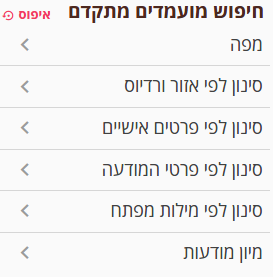
Description of submenus:
- Job and location settings
Define the requested job type and its location. In child care you can also choose a sub-field: babysitter, nanny, au pair, family daycare, kindergarten teacher, summer camp.
Important to note that after changing details you must click "Update search results". - Job details
Sort by general job details, such as job scope, required language, required education, etc. Note that search results update immediately after selection and no need to click search. - General details
General details about the job. For example, you can display only recently updated ads, or only ads with a photo. - Keywords
Search by text in published ads.
Who is responsible for the data provided in published jobs?
Our policy is to publish information as we receive it from ad publishers. The quantity and quality of information are the responsibility of the information provider and the site cannot vouch for the information provided. At helpbook we believe the tools we developed, together with site user cooperation – candidates and employers – will help create focused, accurate and efficient information sharing. Of course you should check everything important to you before finalizing the job and for decision-making. In the end, the agreement between candidates and employers is made outside the site, and helpbook has no involvement or responsibility regarding it.
Notes, job applications and preference markers
The site has a new and unique service that allows reaching employers in the easiest and most convenient way. In every job ad there is an option to apply for a job with one click, and your personal profile will be sent to the ad publisher, saving unnecessary phone calls and inquiries. Before each application we suggest and allow improving the profile to match the requested job and "get the job done". All applications appear in the personal calendar for tracking.
The search process requires thought and sometimes takes time, so to optimize it you can mark personal preferences and write notes on the ads. Your preference markers and notes will be visible only to you, and using them is open to everyone registered on the site and included in the basic package.
Job addresses
To protect job publishers' privacy, the address display is shown in the vicinity and at a random distance from the provided address. This way you have a clear idea of the job's distance from your area of residence.
Facebook - Helpbook
What is Facebook connection and how safe is it?
Benefits of connecting via Facebook
Privacy when connecting via Facebook
What is Facebook connection and how safe is it?
Facebook connection (Facebook Connect) is a service that has gained momentum and is accepted today on sites worldwide. The reason is very simple – Facebook's popularity, and the idea that instead of remembering a username and password for every site, Facebook authentication allows login with your Facebook name and password. In addition, registrants benefit from Facebook's security standards when the Facebook username and password are stored with them.
Benefits of connecting via Facebook
- Fewer passwords to remember
- Shorter registration process
- Building credibility – an indicator that you connected via Facebook will appear in your personal profile and add credibility to your profile.
Privacy when connecting via Facebook
We at helpbook commit not to publish anything on your personal Facebook profile, and not to give a link from the site to your personal profile.
Personal Area and How to Use It
What is my profile strength, does it affect and how can I improve it?
What is the validity of my package?
How can I update, add, turn off or activate an ad?
What is the personal area?
The arena where your account, your ads and the jobs you found are managed.
The purpose of the personal area is to facilitate the search process, managing your account on helpbook, managing your ads and documenting the jobs you found. The personal area consists of several steps that open with a click.
What is my profile strength? Does it affect? How can I improve it?
What is my profile strength? Profile strength is a metric that automatically calculates the amount of information candidates entered on the site. The metric is built because the amount of information affects ad seriousness. You can see your profile strength in your personal area on the site.
Does profile strength have an effect? Obviously a "strong" profile will be more attractive to employers. Here there is a common interest for everyone – you, employers and us as a site. On helpbook there is priority in search results for ads of candidates with strong profiles, and profile strength is a parameter in calculating profile placement in search results, and a strong profile will be placed higher in results.
How can I improve my profile strength? Very simple... In the personal area you can see what is missing to strengthen your profile. You can also go to Personal Area -> My Profile and upload all the data:
- Photo
- Video
- Recommender details
- Email verification
- Facebook connection
- Availability details in the weekly availability table
In addition and no less important: a comprehensive response to the personal questionnaire during registration and comprehensive detailing of experience and skills – are very important for success. You can always return to the questionnaire through editing ads: Personal Area -> Ad Management -> My Privacy Settings.
What is the validity of my package?
You can see the package validity in Manage and Upgrade My Package in the personal area.
Extending package validity
You can extend the package validity by choosing an additional package. For example, if the package validity ends in a week, you can choose through Manage and Upgrade My Package an additional period that will start from the end of the current package period.
How can I update, add, turn off or activate an ad?
Personal Area -> My Ads and Privacy
What are the options:
- Update an existing ad.
- Write a new ad for job search in an additional field.
- Turn off an ad (stop its publication on the site).
- Activate an ad that was turned off.
If you had an ad for a nanny position and turned it off, in the next search you can activate the ad and only update the details that changed.
How do you change password?
When logging into the site with a password or via Facebook, you can change the password here: Personal Area -> My Profile -> My Details. If the password was forgotten you can always click user login, mark forgot password and fill in your email address. In that case an email will be sent to you allowing one-time login to the site for password update in the personal area.
How to optimize the search process with job markers for relevant, question mark or not relevant? And: writing notes.
Job search is a process that requires thought and may take time. Sometimes with so much supply we forget what we liked, what we connected to, who we spoke with, etc. On helpbook you can organize the process in a simple and efficient way:
Marking
At the top of each ad there are icons for marking. With one click you can mark a preference level for each job.
Notes
Through the note writing icon or the notes tab inside the full ad, you can write personal notes (such as impression, conversation documentation, etc.).
Access to markers
At any stage you can see in the personal area all the ads you marked. The markers are private and only whoever marked them can see them.
What are the reviews published about me? Where can I see them? Can I influence the reviews?
What are the reviews published about me? An employer registered on the site with a package that allows them to contact candidates may write reviews about candidates, and reviews are visible to all site users. Former subscribers to such a package on the site can also write reviews.
Why can't everyone write reviews? To maintain a threshold of commitment and seriousness.
Published reviews will protect writers' privacy – they will not include full details and contact information of the writers but only first name and first letter of last name.
For candidates who published ads in several fields, each employer can write a review in one field only.
Where can I see the reviews?
You can see the reviews at Personal Area -> Reviews written about me.
Can I influence the reviews?
Candidates cannot directly influence reviews, because helpbook seeks to create a reliable information system. While you cannot influence review content, you can influence by:
Personal request for reviews about you: Ask someone who can give a professional opinion about you (and is registered on the site) – usually employers will be happy to help. Important to emphasize that the writer's full name and details will not be published and will remain confidential.
What happens if inappropriate content was added to my reviews?
If you think the review is not legitimate or harmful – you can contact us. We try to maintain a reliable and safe site for candidates and employers. In cases of claims we find justified, we reserve the right to accept the claim and remove the review from the site.
Stopping Ad Publication
How do you stop ad publication?
How do you stop ad publication?
If you want to stop ad publication during the package period, you can do so with one click at Personal Area -> My Ads and Privacy
Turning off an ad
Ad publication will stop, but its content is saved in your account for future use and can be reactivated.
Closing Account
How do you close an account?
You can close the account at any time, and reactivate it in the future. Closing an account stops all email sending from the system and stops publication of all ads (if any). Account closing is done in the Personal Area
All About... Payment Options on the Site
I haven't registered yet, how do you pay?
For those on the free package. How can you upgrade a package?
What payment methods can you use?
Is it recurring or one-time charge?
Does helpbook charge candidates or employers for placement?
I haven't registered yet, how do you pay?
During site registration there is no payment obligation and as candidates you can use the site completely free. Payment is designed to highlight and promote your ad, as well as speed up its processing – and ultimately increase the chance of finding work more efficiently and quickly.
Package selection is part of the registration process, and after filling in details – before completing registration – there is an option to choose a suitable package. You can definitely upgrade the package later. Anyone already registered on the site can choose a package again through Personal Area -> Manage and Upgrade My Package
If you chose a paid package, you need to enter details for processing.
Important to emphasize that as part of the current and modern process in website security requirements, payment is made directly with the third party and the credit card number never reaches us.
For those on the free package. How can you upgrade a package?
Package upgrade is done through Personal Area -> Manage and Upgrade My Package. Here you can choose the suitable package and upgrade it.
What payment methods can you use?
You can pay with credit cards or via PayPal. In principle Visa, Isracard, Diners credit cards are accepted (may change according to policy or changing agreements with the credit processing company).
Is the payment secure?
Both PayPal and the credit processing company are professional companies enabling secure purchase in a simple process.
helpbook does not store credit card details, in order to reduce risk for our customers and ourselves.
What is the payment process?
The payment process is simple and convenient:
Choose the suitable package
Fill in initial details on the site
If choosing PayPal, complete details (such as credit card number and validity) on PayPal and confirm payment
Continue browsing on helpbook
Is it recurring or one-time charge?
The charge is one-time. To purchase a package for an additional period, or extend your current package, go to Personal Area -> Manage and Upgrade My Package.
Will I receive an invoice?
Upon receiving confirmation of the purchase from the processing company or PayPal, an invoice will be issued and sent by email – directly to the address you registered with.
Does helpbook charge candidates or employers for placement?
Definitely not. helpbook is not connected to closing agreements between candidates and employers and vice versa. Our worldview is to be an efficient, diverse, convenient and safe tool for transferring information to benefit candidates and employers. Candidates can, if they choose, pay for highlighting and promoting their ad. Employers pay for the right to receive contact details (and certain other details) about candidates, and to publish an ad. We are not involved and do not even know about the continuation of the process between candidates and employers.
Safety
What is helpbook's responsibility regarding safety?
What are the system features related to safety?
What is recommended to do for safety?
What is helpbook's responsibility regarding safety?
Safety is our top priority. We constantly work to build and develop a system that can provide information safety. However it is important for us to emphasize that the information we provide on the site regarding jobs, recommendations and reviews about candidates (and likewise regarding the information you provide as candidates) is displayed as received, without taking responsibility for the quality and reliability of the information.
Users should know that in any case they must check and verify according to their judgment the reliability of the information and jobs.
What are the system features related to safety?
The information received in the system is displayed as we receive it, and we have no ability to verify it. Candidates, important to know that only employers registered with a package may receive contact details. While there may be exceptions, we believe that creating a site subscription is a high and sufficient seriousness metric. Since employers are very concerned about safety for their obvious reasons, we developed a mechanism that helps employers receive many indicators about the information candidates upload to the site. We believe the mechanism leads to a state of natural selection that encourages credibility, reliability and quality:
Abundance of information The information the candidate is required to fill should give a broad picture of the candidate.
Encouraging abundance of information On helpbook we encourage candidates to provide as much information as possible by promoting ads according to the number of parameters they contain. The information includes CV details as well as video, photo, recommenders and more.
Information verification On helpbook every profile indicates whether the candidate verified their phone, email address and whether they registered via Facebook, and whether you can see if there are mutual friends with candidates on Facebook, and sometimes their identity (the information depends among other things on permissions received from Facebook, Facebook policy and the information actually received from Facebook).
Reviews are given by site members and preserved over time. Over time we hope candidates will accumulate reviews and naturally those with higher reviews will stand out.
What is recommended to do for safety?
We recommend you perform all required checks to gain confidence from employers. There are several means, some purely technical and some based on personal feeling:
Go over the information appearing in the ad the employer published on the site – if they published.
Initial contact should be made by email or phone.
It is important to meet with employers. Talk to them, and always remember that an interview is two-way and it is your right and even duty to clarify everything needed for making a good and correct decision.
How can I convey credibility and reliability, and ensure safety in the search process and also after starting work?
Employers who entrust you with what is dearest to them will want to gain confidence before the first phone call and first meeting with you. Employers will turn first and foremost to candidates who convey credibility and reliability, so it is recommended to take advantage of the enormous variety of options in our system.
Fill out the questionnaire in a full, detailed and honest manner.
It is important to add a photo, video, recommender details, and ensure your email address and phone are verified. We reserve the right not to publish profiles at all that do not have email and phone verification.
If possible – it is recommended to connect to us via Facebook, and thereby allow employers to view mutual friends.
In addition it is recommended to ask employers who know you and are members of helpbook to give their review of you.
Safety, credibility and trust
Safety, credibility and trust are the most important topics for employers and of course for you too.
Therefore it is important to ensure:
- Keeping promises Promises are everything agreed between you and the employers. From arriving on time, every small crisis in trust can be critical for continuing the work.
- Communication with employers Ensure employers know what is required of you, and don't wait for them to ask you questions. Reporting can be in conversation, and also by leaving a letter. Everything according to your and the employers' convenience.
- Reliable reporting It is very important to report to employers everything relevant to the work.
- Safety of people, animals and property you are entrusted with Employers entrust you with what is dearest to them and expect (and rightly!) appropriate treatment, responsibility and alertness. Therefore, even if no explicit safety requirements reached you from employers – you must ensure setting high standards yourself. No compromise on safety.