Help for Employers
Publishing and Managing Job Ads
Candidate Search and Available Information
Facebook - Helpbook
"My Account" and How to Use It
Stopping Ad Publication
Closing Account
All About... Payment Options on the Site
Safety
Registration
3 options for using the helpbook platform
Can I change details after registering?
3 options for using the helpbook platform
Using the site without registration
Using the site without registration allows basic experience including search editing and viewing candidate ads and reviews written on the site about candidates.
HelpYellow package (Beta. Limited format only)
What do you get?
Everything included in the HelpGreen package except receiving candidate contact details, providing your contact details, viewing candidate intro videos, and listening to recorded recommendations.
What does that mean?
You can publish a job ad and specify exactly what you're looking for, receive job applications for the position you published, contact potential candidates through the site with your job ad, and get their response on whether they're interested in moving forward and examining fit.
Who is the package suitable for?
For those who want to identify candidates or interested parties with high match chances using a smart filtering system, and only then pay for a package that allows making contact for further acquaintance and fit.
HelpGreen packages
Packages that allow enjoying a wide variety of options the site offers, and in particular to receive candidate contact details and publish your contact details in the job ad. First you need to choose which field the package is for (such as child care).
What do you get with HelpGreen packages?
Contact details of all candidates in the selected field
Viewing candidate intro videos in the selected field
Listening to recorded recommendations from candidate recommenders in the field
Publishing a job ad in the field you chose
Receiving job applications for the position you published
Contacting candidates with one click with the job you publishedWriting reviews about candidates on the site. This right is preserved even after the package period ends
Receiving an indicator on the number of mutual friends between you and candidates in the package field who registered with Facebook and viewing mutual friends (only if Facebook allows viewing them subject to Facebook policy. We emphasize that in many cases it's not possible to see mutual friends)
Important to note: At the end of the package period the account automatically switches to basic package status called HelpRed.
So, how do you register?
Registration takes a short time, in a few simple and quick steps.
All you need is to choose whether to register via Facebook or via email, fill in basic details, pay and if you want - also publish a job ad.
Can I change details after registration?
Certainly. After completing registration you can manage all your data through the "My Account".
It's important to ensure the details are correct and accurate, in order to find exactly the candidates you're looking for.
Important to know that changing details may result in the ad being turned off until it's reprocessed in the system.
Publishing and Managing Job Ads
What personal details are published on the site?
Is it worth publishing a job ad?
Do you have to pay to publish an ad?
Can you subscribe to HelpGreen without publishing an ad?
Why is it recommended to fill in a full address?
What personal details are published on the site?
The details to be published in the ad are under your control, and as long as you don't publish an ad - no details of yours will be published on the site.
Details: The details to be published are those you define in the ad. It should be emphasized that in the HelpYellow package your contact details will not be published in any case. And in a paid package you can publish a job ad without publishing your contact details.
Address: To protect publishers' privacy, helpbook does not publish the exact address but rather the locality name where the job is defined. In search results you'll be able to see the job location on a map at a radius near the real address.
Photo: It's recommended to add a photo of yourself, your child, the house, the dog, etc., of course according to the publication category.
Is it worth publishing a job ad?
The considerations regarding ad publication are personal.
Advantages: More candidates, less time. An ad undoubtedly expands the search circle and gives an advantage in reaching candidates. We allow publishing up to one ad per category within HelpGreen packages at no additional cost.
Advantage: You don't have to publish contact details. For your convenience, when publishing the ad you can define whether a phone number, email address, both or no contact details at all will be displayed.
Advantage: Receiving job applications. Candidates who like your job can apply with one click and their personal profile will reach your personal calendar immediately with an email update to choose from. Unnecessary phone calls and inquiries are saved and the search becomes easy, simple and convenient.
Advantage: Sending offers to candidates. You can send your job ad to a potential candidate or candidates with one click through the site. Candidates will receive a copy of the ad and can respond positively (i.e. they're interested in moving forward with fit clarification) or negatively. This is a way that allows you to efficiently formulate exactly what the requirements are and get responses from candidates - all with the convenience of a click (for both sides).
Ad publication is flexible, and you can add or turn off an ad throughout the package validity period.
Some choose not to publish an ad for various reasons, and that's fine too. The HelpGreen package will allow access to contact details of all candidates on the site (email and/or phone), and in that case the search is active only - you contact only candidates you chose to contact.
Back to menu
Who can view ads
Everyone. All site users can see all job ads. But the contact details you decided to publish can only be seen by candidates who applied for the job (and provided you have a HelpGreen package).
Do you have to register to publish an ad?
Certainly. Publishing a job ad is part of the site's publishing packages. HelpGreen packages include both viewing all candidate details and publishing an ad.
Can you be a HelpGreen subscriber without publishing an ad?
Certainly. The site offers a simple and uniform HelpGreen package model, graded only by package length. Ad publication is an additional option within all HelpGreen packages. Those not interested in publishing an ad simply skip this step in registration and their details remain blocked.
Important to remember! Only the HelpGreen package allows publishing contact details in the job ad and receiving full information about candidates, including contact details.
Why is it recommended to fill in a full address?
The helpbook search mechanism works by location, considering that candidates search for jobs in certain areas. This way you can reduce irrelevant inquiries on one hand, and encourage relevant ones on the other.
In any case, helpbook protects your privacy and does not expose the exact address but only the locality, and the map display is at a random location and random radius in the real address area.
Candidate Search and Available Information
How to search for candidates on the site?
Why do search results show candidates outside the defined area?
Who is responsible for the data provided?
Does the site charge candidates for placement?
How to search for candidates on the site?
On helpbook much thought has been invested in search and displaying relevant and useful information. The goal is convenient, intuitive search that allows focused and efficient finding of suitable candidates.
Below you can read a detailed explanation for those who want to delve into the details.
Basic search: The main search "bar" is at the top of the page.

The search button is on the left side of the "bar". Before clicking "Results" you need to define what exactly you're searching for.
You can search for candidates or jobs, and also choose the employment field from the available fields:
Infant and child care
Housekeeping and cooking
Caregivers for seniors and assistance
Dog walking and pet care
Each search field has subcategories. For example, in child care you can also choose a subcategory from the same menu:
Babysitter
Nanny
Au pair
Family daycare
This option also exists in advanced search (detailed below).
Search by area
In area search you define a search area. Search areas are graded: from searching all areas (i.e. the whole country), search in the central region and so on.
Alternatively you can type a locality name – and the search will focus on it.
Search by radius
In radius search you can type the job address and request to find candidates within a certain radius around it.
Why do search results show candidates outside the defined area?
Candidates that appear in the search are divided into those who live in the defined area/radius, and candidates interested in working in the defined area - but don't live there.
Search result displays
After clicking results, a menu with search results opens.
Two options for viewing search results
List view
This view shows search results as a list of ads including basic details, and a small map showing the location.
Clicking on the ad will open the full candidate profile including all their full details.
Map view
To switch to map view click the map view button.
In this view, search results are displayed on a large map with a table listing the candidates.
Clicking on candidates in the table opens a window with basic details, and clicking on that window leads to the full ad.
Sorting
You can sort results and display them by distance, subscription tenure and other options.
Advanced search
After performing initial search in the top search bar, based on field and location, you can perform advanced search to filter results according to precise needs and requirements.
For example, you can filter ads by rate, kosher keeping, language and so on.
The advanced search menu is specially adapted to each employment field and varies between different fields.
How does search work on helpbook?
The advanced search menu appears after performing initial search.
Example of advanced search menu:
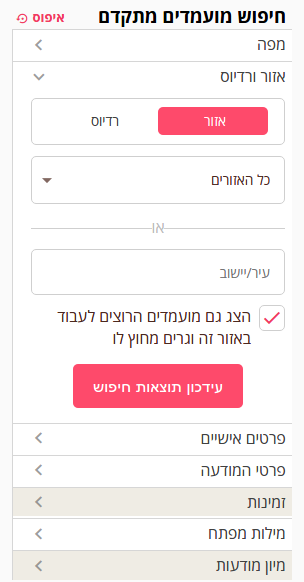
Description of submenus:
Job and location settings
Define the requested job type, its location and also - whether to display in results candidates interested in working in the search area but who don't live there.
After changing details you must click "Update results" (unlike the rest of the advanced search menu which updates automatically).
Candidate details
Sort by general details about candidates such as age, kosher keeping, etc.
Important to note that results update immediately after selection and no need to click search.
Employment requirements
Details regarding employment requirements such as payment, job scope, etc.
Experience, education and additional services
Details regarding experience, education, additional skills relevant to the job and willingness to provide additional services.
Information about candidates
Information about candidates consists of details candidates fill in themselves.
helpbook was designed to allow candidates to present themselves with extensive, detailed and focused information for the employment field.
This information also includes different angles beyond candidates' testimony about themselves, such as recommendations and employer reviews.
However, the amount and quality of information displayed on the site are solely the responsibility of the information provider and the site cannot vouch for the information provided.
Site design encourages candidates to provide abundant information and details to increase the chance of being contacted, but of course not all candidates choose to use all the means and options helpbook provides.
Full candidate details are in the full profile and include:
Personal details
Name, education, age, experience and more.
In search results you can see on the map the candidate's location, at a radius near and random to the real address.
Relevant experience
Candidates fill out a questionnaire prepared specifically for the requested job and adapted to the employment field. The questionnaire includes questions with prepared answers (such as yes/no) and open questions, for example detailing experience and skills.
The goal is to allow candidates to present themselves openly, with emphasis on information relevant to a specific job.
Location and availability
Candidates mark in which area or locality they want to work in a way that doesn't require matching their address of residence (for example – a candidate living in Eilat who wants to work as an au pair in Tel Aviv).
In addition, candidates are invited to mark the exact work hours and days they're available for work.
Contact details
Candidates are asked to provide phone or email for contact.
This information is available for viewing only to employers registered with the HelpGreen package.
Recommenders - Recorded recommendations:
We invite candidates to provide recommenders, whom the site team will contact and with their approval record a recommendation interview that will appear in the candidates' personal profile.
All site visitors can see in candidate ads whether a recommendation recording exists. Listening to the recommendation requires registering on the site as an employer.
Video and photo
Candidates are invited to add a photo and video to their profile. Research and testing have proven conclusively that video recordings are an important service for both candidates and employers for impression purposes with high correlation to the final decision. However, candidates for whom this exposure isn't suitable should also be understood.
Video viewing is only possible for employers registered on the site with a package that allows it.
Reviews
Every subscriber registered on the site as an employer with a package that allows them to contact candidates may write reviews about candidates, which will appear on their profile. This right is preserved even if the package is no longer valid.
The reason the option to write reviews isn't open to everyone is the desire to create a "seriousness" barrier. We believe this is a necessary condition for creating a quality review database.
Additional indicators
Candidate profiles show indicators for email verification, phone number verification and connection to the site via Facebook.
Candidates are required during registration to verify the email address they provided to the site, and recently we've begun requiring phone number verification. Connecting to the site via Facebook is optional.
Multiple candidacies
Candidates can apply for work in multiple fields.
Notes and preference markers
The search process requires thought and viewing a variety of candidates, so to make it efficient users can mark preferences regarding ads, and also write personal notes such as impression, conversation summary, etc.
Using preference markers and notes is open to all site registrants.
Candidate addresses
To protect candidate privacy, the address display is in the vicinity and at a random distance near the address they provided. This way you still have a clear idea of the area of residence and distance between candidates and jobs.
The same principle applies to employer ad display - they're also displayed in the vicinity of the provided location without exposing the exact address.
Who is responsible for the data provided?
Our policy is to publish information as we receive it from candidates, recommenders and review providers.
At helpbook we believe all the tools we developed together with site user cooperation - candidates and employers - will help with focused, accurate and efficient information sharing.
Does the site charge candidates for placement?
Definitely not. helpbook is not connected to closing agreements between candidates and employers.
Our policy is to serve as an efficient, diverse, convenient and safe tool for transferring information to benefit candidates and employers.
Candidates can optionally pay for highlighting and promoting their ad.
Facebook - Helpbook
What is Facebook connection and how safe is it?
Benefits of connecting via Facebook
Privacy when connecting via Facebook
What is Facebook connection and how safe is it?
Facebook connection (Facebook Connect) is a service that has gained momentum and is accepted today on sites worldwide. The reason is very simple – Facebook's popularity, and the idea that instead of remembering a username and password for every site, Facebook authentication allows login to the site with your Facebook name and password.
In addition, those registering via Facebook benefit from Facebook's security standards, when the username and password are stored on Facebook.
Benefits of connecting via Facebook
Fewer passwords to remember
Shorter registration process
Privacy when connecting via Facebook
We at helpbook commit not to publish anything on your personal Facebook profile, and not to give a link from the site to your personal profile.
"My Account" and How to Use It
What is the validity of my package?
How can I add / update / delete / turn off a job ad?
How to optimize the search process with candidate markers for favorite/maybe/no, and writing notes?
What is "My Account"
Managing your account, the ads you formulated and the information you collected about candidates - will appear in your personal area on the site.
The purpose of the personal area is to facilitate the search process, through account management on helpbook, managing your ad, and managing ads of candidates you located.
What is the validity of my package?
You can see the package validity in My Subscription Plan Details.
Extending package validity
You can extend the package period by choosing an additional package. If the package date ends in a week, you can choose in the personal area a package for an additional period that will start from the end of the current package period.
How can I add / update / delete / turn off a job ad?
For subscribers with packages that allow ad publication:
You can...
Write a new job ad (assuming you have a valid package in the ad's field).
Update an existing ad.
Turn off an ad (stop its publication on the site).
Reactivate an ad that was turned off.
The difference between a turned-off ad and a deleted ad - a turned-off ad is saved and can be reactivated later with one click. A deleted ad is not saved.
How do you change password?
When logging into the site with a password or via Facebook, you can change the password in the personal area at Ad Management and My Personal Details -> My Details.
If the password was forgotten, you can click "User login" and mark "Forgot password" and fill in your email address. In that case an email will be sent allowing one-time login to the site for password update in the "My Account".
How to optimize the search process with candidate markers for favorite/maybe/no, and writing notes?
Candidate search is a process that can take time. Sometimes with so much supply we forget who we liked, who we spoke with, etc. On helpbook there's a great option to organize the process in a simple and efficient way:
Marking
In the top row of each candidate's profile there are three icons for marking preferences. With one click you can mark a primary classification for each candidate using these markers.
Notes
When opening the full profile you can enter the note writing tab, for example - how I was impressed by the candidate, who are the recommenders, what we agreed, etc.
Access to markers
At any stage you can see the list of marked candidates in the Personal Area.
Emphasis
The markers and notes are personal and visible only to whoever created them.
Stopping Ad Publication
How do you stop ad publication?
How do you stop ad publication?
Within the packages you can publish job ads that are published as long as the package period is valid.
If you want to stop ad publication during the package period, you can do so with one click in the Personal Area -> My Ad Management:
Turning off an ad
Ad publication is stopped, but its content is saved in your account for future use and can be reactivated.
Closing Account
How do you close an account?
You can close the account at any time, and reactivate it in the future. Closing an account stops all email sending from the system and stops publication of all ads (if any). Account closing is done in the Personal Area
All About... Payment Options on the Site
I haven't registered yet, how do you pay?
For those on the free package. How can you upgrade a package?
What payment methods can you use?
Is it recurring or one-time charge?
I haven't registered yet, how do you pay?
During site registration there is no payment obligation. After clicking register and choosing an employer package, and after filling in initial details via Facebook connection or independent connection, there's an option to choose your preferred package. Assuming you chose a paid package, you'll need to enter your details for processing.
Important to emphasize that as part of the current and modern process in website security requirements, payment is made directly with the third party and the credit card number never reaches us.
You can pay with credit card or PayPal.
For those on the free package. How can you upgrade a package?
Package upgrade is done through Personal Area -> Manage and Upgrade My Package. This is where you can choose the suitable package and upgrade it when needed.
What payment methods can you use?
You can pay with credit cards or PayPal. In principle Visa, Isracard, Diners credit cards are accepted depending on the processing company's policy.
Is the payment secure?
PayPal and the credit processing company enable secure purchase in a simple process.
helpbook does not store credit card details, in order to reduce risk for our customers and ourselves.Back to menu
What is the payment process?
The payment process is simple and convenient:
Choose the suitable package
If you chose credit card then fill in details accordingly
For PayPal choosers, complete details on PayPal and confirm payment
Continue browsing on helpbook.
Is it recurring or one-time charge?
The charge is one-time and does not renew automatically.
Will I receive an invoice?
Upon receiving confirmation of the purchase from the credit card processing company or PayPal (according to the package you chose) an invoice will be issued and sent by email – directly to the address you registered with.
Safety
What is helpbook's responsibility regarding safety?
What are the system features related to safety?
What is recommended to do for safety?
What is helpbook's responsibility regarding safety?
Safety is our top priority. We try to build a system that can provide information safety. However, first it must be emphasized that the information we provide on the site regarding candidates is exactly as we receive it, without taking responsibility for the quality and reliability of the information.
Users should know that in any case they must check and verify according to their judgment the reliability of the information and candidates.
What are the system features related to safety?
The information received in the system is displayed as we receive it, and we have no ability to verify it. However, a series of system features help you as employers get many reliable indicators about candidates. Obviously each system feature by itself can be "bypassed", but we believe the abundance of system features leads to a state of natural selection that encourages credibility, reliability and quality.
Abundance of information - The amount of information the candidate is required to fill should give a broad picture of the candidate.
Encouraging abundance of information - On helpbook we encourage candidates to provide as much information as possible by promoting ads according to the amount of information they contain. The information includes CV details as well as video, photo, recommenders and more.
We also emphasize to candidates the fact that the more information they provide - the number of inquiries to them will increase.
Information verification - On helpbook every profile indicates if they verified their phone, email address and if they registered via Facebook. All candidates must verify email as a condition for publishing their ad.
Reviews are given by site members and preserved over time. Over time we hope candidates will accumulate reviews and naturally those with higher reviews will stand out.
What is recommended to do for safety?
We recommend you as employers perform all the checks you believe in to gain confidence in candidates. There are several means, some purely technical and some based on personal feeling:
Go over all the information that exists on the site including experience details, photo and video, recorded recommendations, reviews, email verification indicator and connection via Facebook.
Make initial contact by email or phone.
Meet with candidates. Talk to them and conduct a thorough interview. If possible bring a friend you trust their judgment.
Searching for the candidate on Facebook or other networks can yield knowledge some of which may be relevant.
After starting work stay alert. Talk with the employee regularly to get reports, and no less important, use your gut feelings.